
Planning REST API

This post is meant to list all REST API resources documented as 25.02
As of version 25.02 of Oracle EPM Cloud, here are all the REST API methods documented by Oracle as far as Planning REST API is concerned.
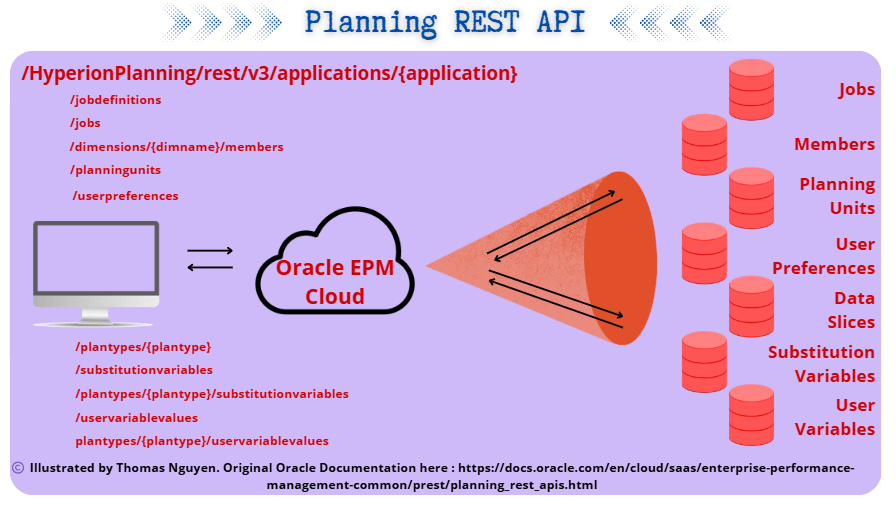
Remember that all Planning REST API resources will allow you to interact with:
- Jobs
- Members
- Planning Units
- User Preferences
- Data Slices
- Substitution Variables
- User Variables
Detailed information on Oracle Documentation Official Website: https://docs.oracle.com/en/cloud/saas/enterprise-performance-management-common/prest/planning_rest_apis.html
Quick 1 page summary below:
| REST Request | REST Resource | Resource description |
|---|---|---|
| GET | /HyperionPlanning/rest/v3/ /applications/{application}/jobdefinitions | Get job definitions for the types of jobs that can be scheduled to run |
| POST | /HyperionPlanning/rest/v3/applications/{application}/jobs | Execute several jobs simultaneously by providing the job name and type |
| GET | /HyperionPlanning/rest/v3/applications/{application}/jobs/{jobIdentifier} | poll the server to get the processing state for a job with a specified ID. |
| GET | /HyperionPlanning/rest/v3/applications/{application}/jobs/{jobIdentifier}/details | poll the server to get execution details for a Job with the specified Job ID. |
| GET | /HyperionPlanning/rest/v3/applications/{application}/jobs/{jobIdentifier}/childjobs/{childJobIdentifier}/details | get the execution details for the child Job with the specified ID. |
| POST | /HyperionPlanning/rest/v3/applications/{application}/dimensions/{dimname}/members | add a new member to the application outline in the specified dimension and plan type and under the specified parent member. |
| GET | /HyperionPlanning/rest/v3/applications/{application}/dimensions/{dimname}/members/{member} | get the specified member’s properties. |
| GET | /HyperionPlanning/rest/v3/applications | returns a list of applications to which the specified user is assigned. It also provides certain key information about the application. |
| POST | /HyperionPlanning/rest/v3/applications/{application}/planningunits?q={“scenario”:”scenarioName”,”version”:”versionName”}&offset=10&limit=10 | returns a list of planning units for the specified application and owned by the user initiating the REST API. (Note that this does not return all planning units for all applications and users.) |
| POST | /HyperionPlanning/rest/v3/applications/{application}/planningunits/{puIdentifier}/historyandannotations?q={annotSeq=-1,logSeq=-1}&offset=10&limit=10 | return a merged list of history and annotations for the planning unit that the requesting user owns for the specified Scenario, Version, and PM Member. |
| GET | /HyperionPlanning/rest/v3/applications/{application}/users/{userId}/photo | get an image for the requested planning unit owner if a photo is uploaded for the owner. |
| GET | /HyperionPlanning/rest/v3/applications/{application}/planningunits{puIdentifier}/promotionpath | get a list of promotion path nodes for a given application, user, and planning unit. The planning unit is identified by the provided scenario, version, and PM member. |
| POST | /HyperionPlanning/rest/v3/applications/{application}/planningunits{puhIdentifier}/availableactions | return a list of the next set of applicable actions available for the planning units, consisting of the specified scenario, version, and PM Members (Entity: Secondary member) that are owned by the requesting user. |
| GET | /HyperionPlanning/rest/v3/applications/{application}/pufilters | Returns all filter types with all possible values by which users can filter planning units for a given application. For every value, there is a label (in the client locale) representation and an integer value. The labels are shown to end users to pick from, but whenever possible, the client should submit the integer value that is unique to the server. Every application supports several types of filters that are indicated by the type field. |
| POST | /HyperionPlanning/rest/v3/applications/{application}/planningunits/{puhIdentifier}/actions | change the status of the planning units consisting of the specified scenario, version, and PM Members (Entity: Secondary member) that are owned by the requesting user. |
| GET | /HyperionPlanning/rest/v3/applications/{application}/userpreferences | Returns the requesting user’s display preferences. |
| POST | /HyperionPlanning/rest/v3/applications/{application}/plantypes/{plantype}/importdataslice | import data given a JSON data grid with a point of view, columns, and one or more data rows. |
| POST | /HyperionPlanning/rest/v3/applications/{application}/plantypes/{plantype}/exportdataslice | export data for a specified region. |
| POST | /HyperionPlanning/rest/v3/applications/{application}/plantypes/{plantype}/cleardataslice | clear Planning and Essbase data for a specified region. In order to run this operation, the user must be an administrator. |
| GET | /HyperionPlanning/rest/v3/applications/{application}/substitutionvariables | retrieve all substitution variables defined for the application (all plan types). |
| GET | /HyperionPlanning/rest/v3/applications/{application}/substitutionvariables/{subVarName} | retrieve a substitution variable defined for the application. |
| POST | /HyperionPlanning/rest/v3/applications/{application}/substitutionvariables | create or update substitution variables for the application. |
| GET | /HyperionPlanning/rest/v3/applications/{application}/plantypes/{plantype}/substitutionvariables | retrieve a list of retrieve a list of substitution variables defined at the plan type level. |
| GET | /HyperionPlanning/rest/v3/applications/{application}/plantypes/{plantype}/substitutionvariables?q={“derivedValues”:true} | retrieve a list of derived substitution variables at the plan type level. |
| GET | /HyperionPlanning/rest/v3/applications/{application}/plantypes/{plantype}/substitutionvariables/{subVarName} | retrieve a substitution variable defined at the plan type level. |
| GET | /HyperionPlanning/rest/v3/applications/{application}/plantypes/{plantype}/substitutionvariables/{subVarName}?q={“derivedValues”:true} | retrieve a derived substitution variable defined at the plan type level. |
| POST | /HyperionPlanning/rest/v3/applications/{application}/plantypes/{plantype}/substitutionvariables | create and update substitution variables at the plan type level. Variables in the payload that exist at the plan type level are updated. New variables are created at the plan type level. |
| DELETE | /HyperionPlanning/rest/v3/applications/{application}/plantypes/{plantype}/substitutionvariables/{subVarName} | Delete a Substitution Variable at the Plan Type Level |
| DELETE | /HyperionPlanning/rest/v3/applications/{application}/substitutionvariables/{subVarName} | Delete a Substitution Variable for the Application |
| POST | /HyperionPlanning/rest/v3/applications/{application}/plantypes/{plantype}/substitutionvariables:delete | Delete Substitution Variables at the Plan Type Level |
| POST | /HyperionPlanning/rest/v3/applications/{application}/substitutionvariables:delete | Delete Substitution Variables for the Application |
| GET | /HyperionPlanning/rest/v3/applications/{application}/uservariablevalues | User Variable Values Defined for the Application |
| GET | /HyperionPlanning/rest/v3/applications/{application}/uservariablevalues/{userVarName} | User Variable Values Defined in the Application by the User Variable Name |
| GET | /HyperionPlanning/rest/v3/applications/{application}/uservariablevalues?q={“member”:”memberName”} | User Variable Values Defined in the Application by Value |
| GET | /HyperionPlanning/rest/v3/applications/{application}/plantypes/{plantype}/uservariablevalues?q={“username”:”userName”} | User Variable Values Defined for the Application by the User Name |
| GET | /HyperionPlanning/rest/v3/applications/{application}/plantypes/{plantype}/uservariablevalues?q={“username”:”userName”,”member”:”memberName”} | User Variable Values Defined in the Appplication by the User Name and Value |
| POST | /HyperionPlanning/rest/v3/applications/{application}/uservariablevalues | Set the User Variable Values for the Application |
I would put the methods to interact with Connections separately, as the root of the REST Resource (/HyperionPlanning/rest/epm) and the API version (v1) is different:
| REST Request | REST Resource | Description |
|---|---|---|
| GET | /HyperionPlanning/rest/epm/v1/applications/{application}/connections/{connectionRef} | View a Connection |
| GET | /HyperionPlanning/rest/epm/v1/applications/{application}/connections | View all Connections |
| POST | /HyperionPlanning/rest/epm/v1/applications/{application}/connections/{connectionRef} | Update a Connection |